
Cancel a reservation
Cancel an upcoming meeting room reservation in HUB, including the required cancellation reason, the one-hour cutoff before the meeting, why the Cancel Reservation button may be disabled, and how no-shows are billed.
On this page
Cancel a booking you no longer need so others can use the room.
Before you start
- Cancel at least one hour before the meeting starts. After that, the button is disabled.
- You need permission to book meeting rooms. If you don't see the button, ask your company's HUB admin.
Warning: A booking that isn't cancelled at least one hour before it starts counts as a no-show and is billed.
Cancel a reservation
- Select Reservations in the sidebar.
- Select the reservation on the calendar or in Upcoming Reservations.
- Select Cancel Reservation.
- Enter a Reason for cancellation.
- Select Cancel Reservation to confirm. The booking is cancelled.
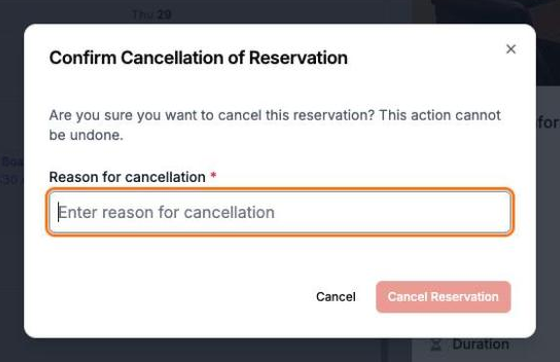
Warning: You can't undo a cancellation. To keep the time, you'll need to book again, and the slot may be taken.
Where do cancelled reservations go?
Cancelled bookings leave the calendar. To see them, open the History tab and choose Cancelled. Each one shows the reason and who cancelled it. See View your reservations and history.
Why can't I cancel?
- The meeting starts in less than an hour. Contact the on-site team at your building.
- The meeting has already started or ended. Past bookings can't be cancelled.
- You don't have booking permission. Ask your company's HUB admin.