
Buy a Proworking membership
Step-by-step checkout for a Proworking coworking membership. Choose monthly, quarterly or yearly billing, a start date, the number of seats and your floor, apply a voucher, then pay by card or with a saved card. Explains future start dates and auto-renewal.
On this page
Before you start
- Pick a Proworking plan and a building first. See Explore plans and choose a KMC location.
- You need a HUB account. If you aren't signed in, checkout asks for your email first. See Verify your email at checkout.
- Have a credit or debit card ready.
Set up your membership
- Under Membership, open Payment and choose how often you pay. Some options show a Save tag with the discount.
- Under Membership Starts, pick today or a date up to 30 days ahead.
- Under Seat, use the plus and minus buttons to set the number of seats.
- Check Home Location. If the building has more than one floor, choose one in Select Floor.
- Optional: type your company in Organization Name.
- Optional: enter a code in Voucher Code and select Apply.
- Select Continue to Payment.

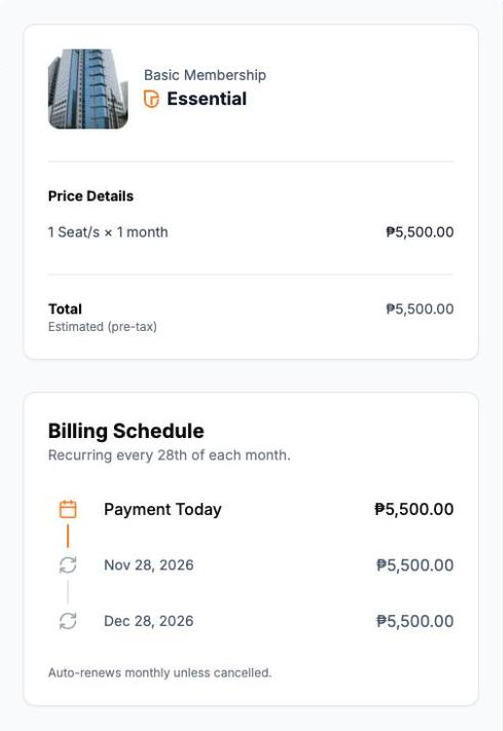
The price summary shows the Price Details, the Total and the Billing Schedule. Totals are estimates before tax.
Note: If you manage more than one company in HUB, a Confirm organization dialog appears. The membership is billed to the company shown. Select Change profile to switch, or Continue to payment.
Pay for your membership
- If you have a saved card, it appears under Pay with a saved card. Keep it selected, or select Pay with a different card.
- For a new card, enter Name on Card, Card Number, Expiry and CVV.
- Fill in the Billing address. It's saved for your future bookings.
- Tick the box that authorizes the charge and automatic renewal.
- Select Start Membership, or Confirm if your start date is in the future.
- Wait while HUB prepares your membership, invoice and payment. When it's done, you're taken to your dashboard.

What if my start date is in the future?
You won't be charged today. Your card is saved and charged automatically on your start date, when your membership and meeting-room access begin.
How does renewal work?
Your membership renews automatically on the same date each billing period. You can cancel from HUB before the renewal date.
Warning: The charge happens as soon as you select Start Membership. Check the seats, billing period and start date first.
Troubleshooting
- Temporarily unavailable on the Continue button means new Proworking sign-ups are paused for a system upgrade. Try again later.
- Please enter a valid organization name means the name looks like a placeholder, such as "N/A" or "TEST". Enter your real company name, or leave it empty.
- This payment method is no longer available means a saved card was removed. Add a new card.
- If setup shows Taking longer than expected, your payment was received. See What happens after you pay.