
Book a meeting room
Reserve a meeting room in HUB. Choose a building and room, pick a date and a free start time, set the end time and agenda, check how free hours and credits apply, then confirm. Also covers why you can't select a time slot or see Book a Reservation.
On this page
Before you start
- You need a HUB account with access to meeting rooms. If you don't see Reservations in the sidebar, ask your company's HUB admin.
- The buildings and rooms you can book depend on your plan.
- Can't sign in? See Reset your password.
Book a room
- Select Reservations in the sidebar.
- Select Book a Reservation.
- Open Select a Building and choose a building.
- Under Available Rooms, select a room.
- Use the calendar to go to the date you want.
- Select a free time slot to set your start time.
- In the booking window, open End Time and choose when your meeting ends.
- Enter an Agenda.
- Check the Credits breakdown, then select Confirm Reservation. You're booked.


Time slots are in 30-minute steps. After you confirm, HUB takes you back to Reservations and shows your booking on the calendar.

Check the cost before you confirm
The Credits breakdown shows how your hours are covered:
- Free of charge: free hours on rooms marked Free up to 2 hrs/day.
- Billed to credits: hours taken from your monthly meeting credits.
- Billable: hours beyond your free hours and credits.
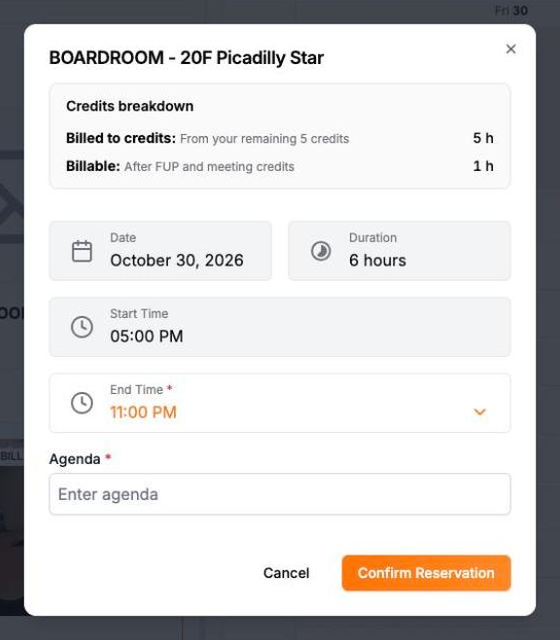
Learn more in Meeting room credits and free hours. If the button says Continue to Payment, see Pay for extra meeting room hours.
Why can't I select a time slot?
- The slot is taken. Booked times show as blocked on the calendar. Try another time or room.
- The date is in the past. You can only book from today onward.
- Availability didn't load. If you see Unable to load room availability. Please try again., refresh the page.
- The slot was just taken. If someone books it first, HUB shows Time slot no longer available. Pick another time.
Why don't I see Book a Reservation?
The button shows only when you have meeting credits left, or your account is allowed to go over its credits. If you need more hours, contact Client Services.
Why can't I confirm?
If you see This booking exceeds your remaining meeting credits, your account can't go over its credits. Choose a shorter time or contact your account manager.